Build your curriculum
Add sections and lectures — video, articles, quizzes, assignments, practice tests.
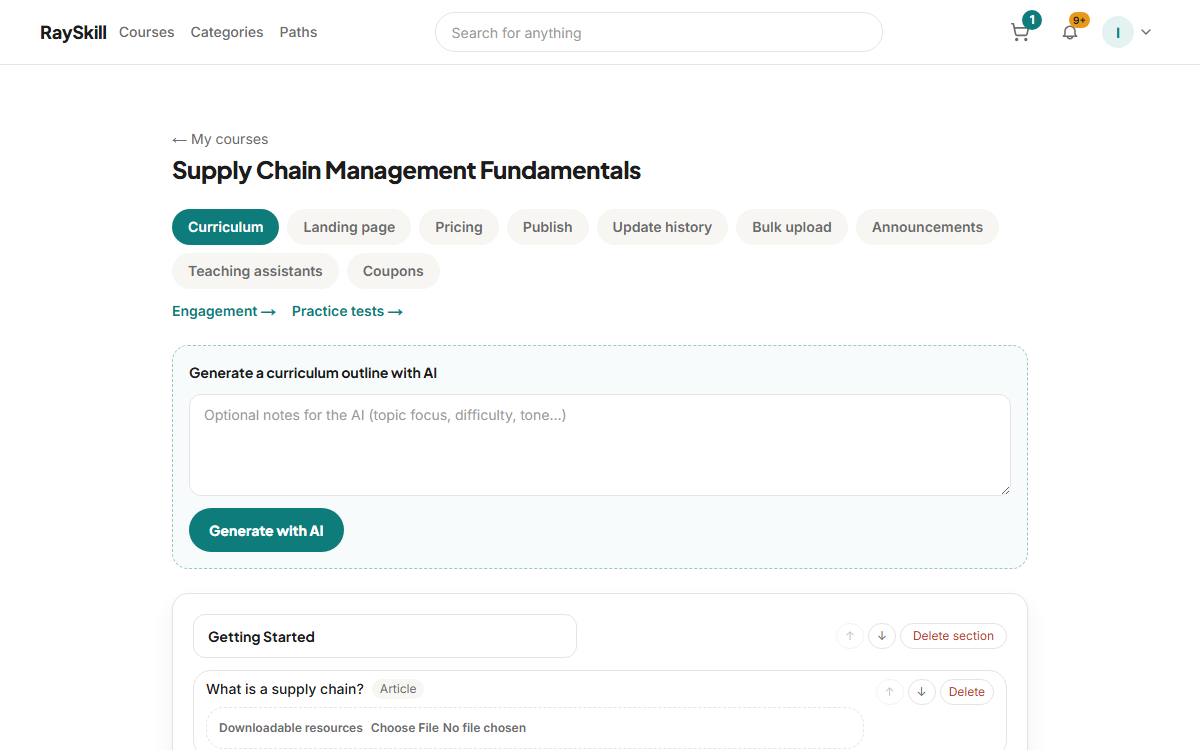
Add a section
Sections group related lectures. Most courses use one section per major topic.
Add lectures inside the section
Pick the type as you create it: video, article, quiz, assignment, or practice test.
Upload video and let it process
Video is transcoded after upload, and captions can be generated automatically. The lecture shows "processing" until it is ready to stream.
Mark one or two lectures as a free preview
Previewable lectures are what prospective learners watch before buying. A course with no preview converts worse.
Reorder by dragging
Order is saved as you drop. Add downloadable resources to any lecture from the same screen.
Adding a lot at once?
The Bulk upload tab takes a CSV of lectures and reports success or failure per row.
For instructors — other guides
- Create your first course — Start a draft, then fill in the parts learners see before they buy.
- Set your price — Choose a price and currency, add regional prices, and run coupons.
- Publish your course — Pass the checklist, then wait for a short review before it goes live.
- See how your course is doing — Enrollments, revenue, completion, ratings, and which lectures lose people.
- Answer questions and post updates — Keep up with Q&A, highlight the best answers, and announce changes.
- Understand your earnings and payouts — Where your revenue share comes from, and how money reaches you.