See how your course is doing
Enrollments, revenue, completion, ratings, and which lectures lose people.
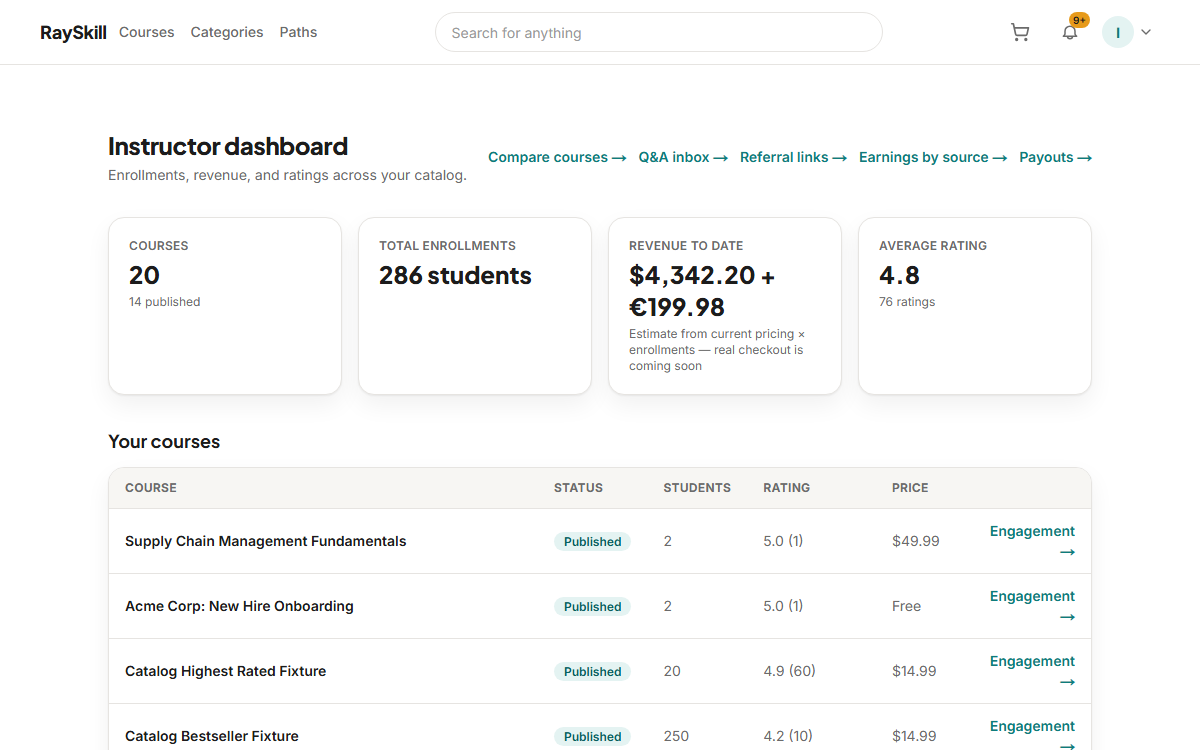
Start on the instructor dashboard
Enrollments, a revenue estimate, and average rating across everything you teach.
Where you end up: The dashboard is at /instructor/dashboard.
Compare your courses
The comparison view ranks your own courses side by side, which is the fastest way to see what is working.
Look at per-lecture engagement
Engagement shows where learners stop. A sharp drop on one lecture usually means that lecture, not the course.
Read your reviews
You can post a public response under any review on your own course. One reply, visible to everyone.
For instructors — other guides
- Create your first course — Start a draft, then fill in the parts learners see before they buy.
- Build your curriculum — Add sections and lectures — video, articles, quizzes, assignments, practice tests.
- Set your price — Choose a price and currency, add regional prices, and run coupons.
- Publish your course — Pass the checklist, then wait for a short review before it goes live.
- Answer questions and post updates — Keep up with Q&A, highlight the best answers, and announce changes.
- Understand your earnings and payouts — Where your revenue share comes from, and how money reaches you.